
A Malcom IO game
Spelling, times tables, division and touch typing in one adventure that grows with your kid — three subjects in the apps, all four in the browser. Fun, not childish.
Pick a subject: hear a word and spell it out, race the times-tables trail on a number pad, turn those tables around and divide, or learn the keyboard properly in a browser. QuillQuest turns practice into a quest — and builds real skill along the way. Great for grades 3–8 (roughly ages 8–14); one tap of your kid’s age sets the starting level and it moves with them from there, so younger and older learners fit right in too.
Free on iPhone, iPad, Android & the web — no ads, no in-app purchases. Want touch typing? Choose the browser. It needs a real keyboard, so the apps have spelling, times tables and division.
Why parents trust it
Made by a parent who wanted practice their own kids would actually choose.
Plays offline in the apps — no internet needed. (The browser version needs a connection.) No ad networks, no sponsored content, no in-app purchases. No cookies, no trackers, no behavioral analytics, no fingerprinting. No chat, no links out, and no other players — there is no way for anyone to reach your child through QuillQuest.
A graded curriculum in every subject, mastery-based levels, and spaced-repetition review of whatever your kid misses.
Optional reminders (off by default) and streaks that reward just showing up — no nagging, no daily-loss anxiety.
Each kid gets their own profile, buddy and avatar. Kids pick what to play and nobody is ranked against anyone else. The daily goal starts at 20 answers — change it or switch it off.
Private by design — read our privacy policy, the information for schools, or get support.
What kids get
 Ivy
Ivy Owen
Owen Mia
MiaIvy, Owen & Mia read every spelling word aloud.
Take a look
One adventure, whichever subject you pick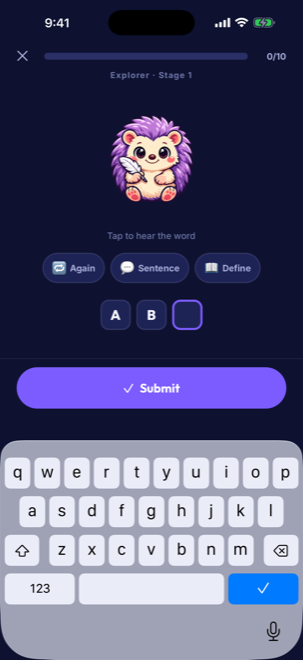 Hear it. Spell it. Nail it.
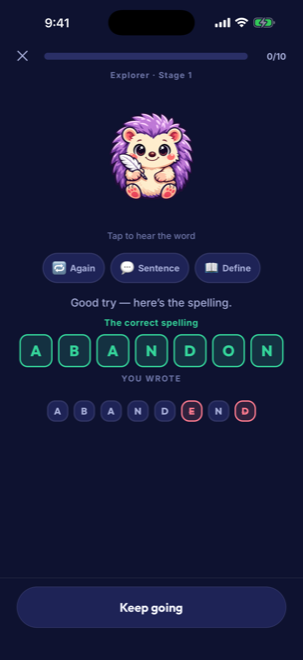 Feedback that actually teaches
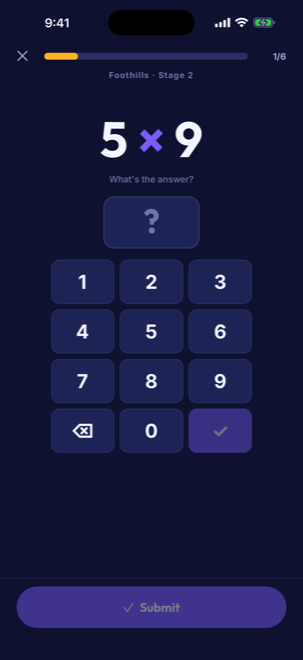 Times tables that feel like a game
What we collect
| Student accounts | None. There is no sign-up, login, password or email address. |
|---|---|
| Personal information collected | None. No name, age, email, phone number or precise location leaves the device. |
| Advertising | None. No ad networks, no sponsored content, no in-app purchases. |
| Analytics and tracking | None. No cookies, no trackers, no behavioral analytics, no fingerprinting. |
| Data sold or shared | Never. There is nothing to sell, and no third party receives student data. |
| Works offline | In the apps, completely — extra voices and spoken example sentences download once from our content host and are then kept on the device. The browser version needs a connection: the page has to load, and it streams clips as it plays. |
| Syncing between devices | Optional, off by default, and set up by a grown-up. Practice progress and the cartoon buddy sync, under an anonymous code, so a grown-up can tell whose save it is — never a name or an age. |
| Age range | Roughly 8–14 (grades 3–8). A learner’s age sets the starting level; harder levels are earned by mastering the one below. |
| Cost | Free. No paid tier, no trial, nothing to procure. |
The full privacy policy spells out everything above, including the one thing a plain “we collect nothing” answer would gloss over: a request for a spoken clip necessarily names the word it speaks.
quillquest.net and quillquest.malcom.io;
audio.quillquest.net and audio.malcom.io, which serve audio clips;
and sync.quillquest.net and sync.malcom.io, which carry optional
progress syncing. None of them carries advertising, trackers or any identifier for a
student — see the hosts-to-allow table for the full detail.
If QuillQuest is blocked on your network and you would like it reviewed, please write to
support@quillquest.net.
Ready to play?
Free and private — no ads, no in-app purchases, no tracking, no accounts. The apps play offline. Spelling, times tables, division and touch typing, worth leveling up.
Free on iPhone, iPad, Android & the web.